Get Better Sound from your Mobile Ham Radio
I usually have only 1 rig in the car, but the speaker in my mobile units are almost never adequate in the noisy environment of an automobile. Some years ago, I purchased a pair of 3” wide-range speakers that were a perfect fit in some un-used speaker mounts in the dash of my Olds 98. I connected them to my VHF rig and I liked the way they sounded so much that, when I got rid of the car, I kept the speakers.
Perfectly fitting speakers for any car are available from a number of manufacturers and, by using existing, unused speaker openings (most cars have several), you avoid adding extra clutter in your car (XYLs like this) while gaining impressive sound from your rig.
My previous vehicle had an un-used 4” x 10” speaker opening in the center of the dash. Sometimes this size speaker can be difficult to find, so I removed the steel filler plate, drilled two 3” holes in it and mounted both of my 3” widerange speakers side-by-side. Actually, the 2 speakers do not have to be close to one another; in fact, although I used two, you really don’t need to use more than one, although you can be more versatile if you do - read on. Just make use of any available openings. In my Olds, they were on opposite ends of the dash but, as long as you maintain proper phase, they’ll sound fine.
Another way to handle the problem is to use an inexpensive (under $20) wireless (FM) MP3 player with a 3.5mm input jack. And, if the band is dead, you’ll have the added advantage of being able to play your favorite tunes using the MP3 player! Be careful, though, because some of them are not well-shielded from RF and your ham rig might be too much for it to handle. More and more newer vehicles, and some after-market radios, actually have a built-in 3.5mm input jack for use with a SmartPhone or other external device. If yours happens to have one, you should try that first. All of these methods have the added advantage of being able to use your sound system’s EQ controls to tailor the sound for ham radio use. But you lose the ability to monitor the repeater while listening to the car's FM radio. If that's important to you, use an external speaker instead (as outlined above).
Try installing two ham rigs (or a rig + a scanner) in your car.
Another feature I wanted was to be able to re-configure the speakers so that, when used with only 1 rig, they could be connected either in parallel or in series. Why? Because not all rigs work best with the same speaker impedance, and you will get a slightly different “sound” from 2 speakers connected in series than when the same 2 speakers are connected in parallel. You kinda need to hear it to “get it” but, for example, series-connected speakers tend to act like audio chokes and will roll-off HF audio response. So I added a switch to change the connection.
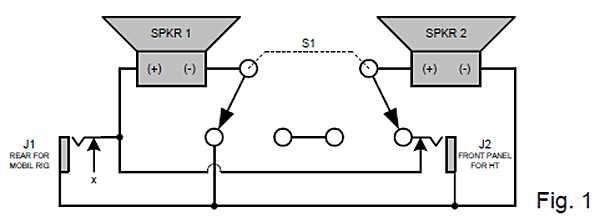
In Figure 1, when S1 is set for parallel connection, J1 feeds both speakers in parallel or, when you connect a 2nd rig to J2, the speakers will automatically operate independently, with 1 speaker connected to each rig. When S1 is set for the series connection J2 is disabled, so use J2 for your “secondary” rig. (NOTE: The ’commons’ of each rig will be connected together - it’s up to you to determine if this is OK with your rigs. This shouldn’t be any problem with a hand-held.)
J1 & J2 = 1/8” closed circuit jack.
S1 = DPDT switch, any style.
SPKR 1 & SPKR 2 = Speakers, any size or style, preferably matching.
POS’N. 1 = J1 - Parallel or if 2nd rig is used,
J1/J2 Separate connection
POS’N. 2 = J1 - Series connection
J2 - No connection
Observe speaker polarity as shown or the sound will cancel when used with a single radio.